

Snapline: Why the Outside Pegs Matter
Ever select a peg in Snapline and watch the band stretch somewhere you didn't expect?
Maybe it covers the green target, but it also catches a red hazard.
The trick is understanding how the band decides where to go.
You're not drawing a path. You're building a shape.
The band follows the outside pegs
Every Snapline board has pegs you can select. Each puzzle limits how many you can use.
The band automatically stretches tight around your outermost selected pegs.
Your job is to get every green target inside the band while keeping every red hazard outside.
Here's the part that's easy to miss.
Selecting a peg inside your existing shape doesn't change its outline.
Imagine stretching a rubber band around three pegs to form a triangle. Now imagine placing another peg somewhere inside that triangle.
The rubber band wouldn't move. It's already stretched around the outside.
Snapline works the same way. The inside peg still uses one of your allowed anchors.
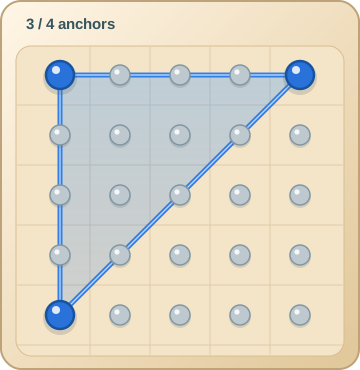
Reveal what the inside peg changes
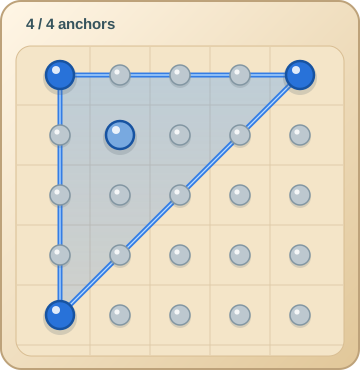
The outline stays put, but the anchor count goes from three to four.
Look at the shape before selecting
Let's try a small example.
Imagine four pegs at the corners of a square, with a green target near the top and a red hazard farther down on the right.
You can select three anchors.
If you choose the top-left, top-right, and bottom-left pegs, the band forms a triangle.
The green target is inside. The red hazard stays outside.
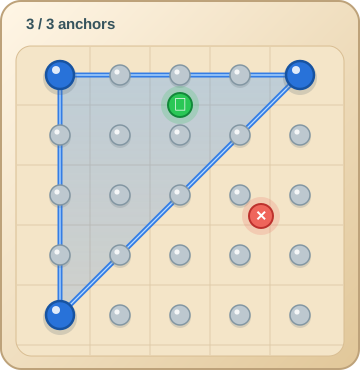
What changes if you choose the bottom-right peg instead of the bottom-left?
Reveal the changed shape
The band stretches across a different part of the board.
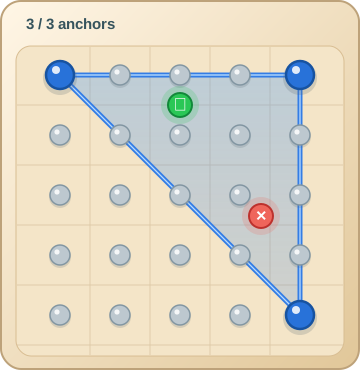
It still catches the target, but now the hazard is inside too.
Same number of pegs. Very different result.
That's why selecting a peg farther away isn't always helpful.
Don't try to make the band bend inward
Here's another useful thing to remember.
The band pulls tight around the outside of your selections. It can't make a little inward turn just because there's a hazard nearby.
So if a red hazard is sitting between two green targets, don't immediately look for a peg you can use to bend the band around it.
Instead, look at the whole shape.
Can you move one of the outside anchors so the band still covers both targets but leaves the hazard outside?
Sometimes one different peg is all it takes.
Think about the spaces between pegs
When you're choosing anchors, it's natural to focus on the pegs themselves.
But try looking at the straight edges the band will form between them.
Those edges determine which targets end up inside and which hazards stay outside.
Before selecting your next peg, ask yourself:
- Will this change the outside shape?
- Does it bring a hazard inside?
- Can I cover the targets with a tighter shape?
Later Extreme puzzles add blocker posts. The band must leave those outside too.
Give it a try
Next time you play Snapline, don't start by selecting the pegs closest to every target.
Look at the entire board first.
Try to imagine the shape before placing your anchors. Pay particular attention to the line between each pair of outside pegs.
You might find that the best solution uses a peg you weren't considering at all.
Play Snapline on Uncle Logic and see what happens when you start thinking about the band instead of just the pegs.